

You finally got your monitor arm. The box arrives, you open it with excitement—only to realize it doesn't fit your desk. Sound familiar? You double-checked the desk thickness before buying. You did your research. Still, something's off. Don't worry—you're not alone. The truth is, compatibility isn't just about thickness. There are a few overlooked factors that make all the difference. Let's walk through them together.
💡The Material of Your Desk
Not all desks are created equal—some materials are more vulnerable to clamp pressure and require extra caution:
❗Glass desks – Prone to cracking under concentrated pressure
❗Hollow-core desks (e.g., honeycomb particle board) – Lack internal support, risking collapse
❗Soft or thin surfaces – May dent or deform over time
How to protect your desk and ensure a safe installation?
🔧Use a desk protection plate to distribute clamp pressure evenly and prevent surface damage.
🔧Choose an alternative mounting method—such as a grommet mount or through-desk fixation—to bypass fragile areas.
🔧Verify that the clamp's load capacity aligns with your desk's structural limits to avoid long-term deformation or cracking.
🔧Always use a level during installation to ensure even pressure distribution, extending both the arm's and the desk's lifespan.
💡The Shape of Your Desk
✅ Flat surface required – The mounting area must be completely level, with no uneven patterns or textures that could break the clamp's grip.
✅ Avoid desks with edge frames – If your desk has a structural lip along the edge (see image), clamping won't work. Use a grommet mount instead.

✅ Watch for angled edges – A slight slope is okay, but if the angled section exceeds 2cm, the clamp won't hold securely—risking your monitor's stability. Use a grommet mount instead.

💡The Thickness of Your Desk
Now for the detail most people remember—but often get wrong: desk thickness.
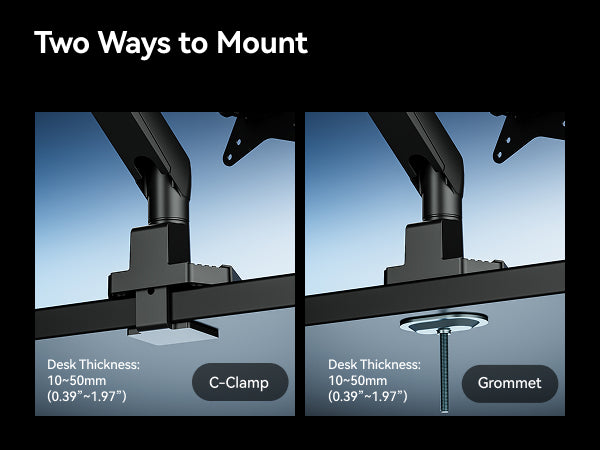
Once your desk passes the flatness, frame, and angle checks, measure its thickness carefully. Every Humanex monitor arm is designed with flexibility in mind, offering dual mounting options—clamp or grommet—so you can choose the method that works best for your desk's unique measurements.
[C-Clamp: 10-50mm] & [Grommet: 10-50mm]
Single Monitor Arm: Humanex TX02-1B, Humanex TX02-1B-A, Humanex TX02-1G-A
Dual Monitor Arm: Humanex TX02-2PB-01, Humanex TX02-P2B-A, Humanex TX02-P2G-A, Humanex TX02-2G-A
[C-Clamp: 10-75mm] & [Grommet: 10-45mm]
Single Monitor Arm: Humanex TX03-1G
Dual Monitor Arm: Humanex TX03-2G
[C-Clamp: 12-45mm] & [Grommet: 12-75mm]
Single Monitor Arm: Humanex TX05-1B
Find your thickness, pick your arm, and mount with ease.
Want to learn more about the differences between Humanex monitor arms? Subscribe to our blog and never miss a deep dive.

Leave a comment
All comments are moderated before being published.
This site is protected by hCaptcha and the hCaptcha Privacy Policy and Terms of Service apply.